Tool Description
ProteinInference maps the identified peptides back to proteins and reports protein groups: sets of proteins that share their peptide evidence.
How does Protein Inference work?
One Peptide, multiple Proteins
A peptide identified by PSMStatistics often fits more than one protein, for example two splice variants of the same gene. Each protein group gets a score from its peptides and a decoy score from the reversed proteins. The tool uses these scores to estimate a protein-level q-value.
How Protein Groups are formed
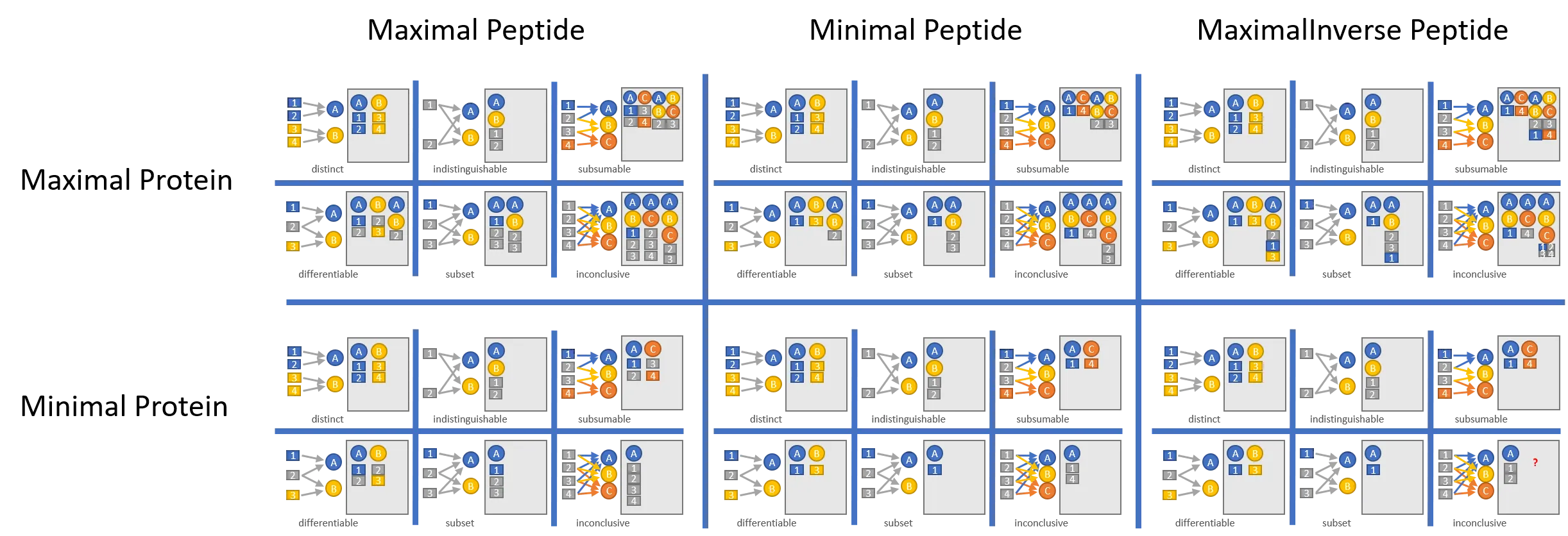
Two parameters decide how groups are formed and which peptides count for them. Take two proteins pA and pB, each found by one unique peptide and both by a third shared peptide. Protein (the integration strictness) decides whether pA, pB and the group pA;pB are all reported or whether overlapping groups are merged into the smallest set that explains every peptide. Peptide (the peptide usage) decides whether the abundance of pA;pB later comes from the shared peptide only or also from the peptides unique to pA and pB. The figure shows the outcomes for every combination.
InputsFiles and command-line flags
These inputs are needed to execute the tool:
| Flag | Meaning | Comes from |
|---|---|---|
-i |
one or more .qpsm files, or a directory that is searched for *.qpsm |
PSMStatistics |
-d |
the SQLite peptide database | PeptideDB |
-g |
optional GFF3 annotation of the proteome | your genome annotation |
-o |
the output directory, created when missing | - |
-p |
the parameter file in JSON | ProteinInferenceParams.json |
-dc |
switch: save diagnostic charts to the output directory |
- The GFF3 file tells the tool which proteins are transcripts of the same gene.
- With it the Class column (the peptide evidence class) separates groups made of isoforms of one gene from groups that mix unrelated proteins. Without -g every database protein counts as its own gene and the class carries no such information.
- For every input
run.qpsmthe tool writesrun.prot, tab separated with a header. - JoinQuantPepIonsWithProteins and AddDeducedPeptides read these
.protfiles. - With
-dcthe tool saves a chart of scores against Q-values, as QValueGraph.html in the output directory when the files are grouped and asrun.prot_QValueGraph.htmlper run otherwise. - Logs go to
ProteinInference_log.txtand a fewProteinInference_<step>_log.txtfiles in the output directory. There is no parallelism flag.
Parameter fileDefault values and tool settings
| Parameter | Default | Meaning |
|---|---|---|
ProteinIdentifierRegex |
"Cre\S+" |
Regex that extracts the protein identifier from the protein names in the database and, with -g, from the GFF3 entries. The default matches Chlamydomonas identifiers. Put a pattern for your own proteome here. |
Protein |
ProteinInference.IntegrationStrictness.Maximal |
Maximal keeps every protein group intact. Minimal merges overlapping groups into the smallest set of proteins that explains all peptides. |
Peptide |
ProteinInference.PeptideUsageForQuantification.Minimal |
Minimal uses only the best matching peptides of a group. Maximal also uses peptides that point to a larger group containing this one. MaximalInverse also uses peptides that point to a part of this group. |
GroupFiles |
true |
Infer all input files together: the peptides of every run go into one inference and one q-value calculation, and every output file reports the same protein groups, each restricted to the peptides seen in that run. AddDeducedPeptides needs this. false infers each run on its own. |
GetQValue |
QValueMethod.LogisticRegression FDRMethod.MAYU |
Estimate the protein FDR with MAYU and turn it into q-values by logistic regression on the target and decoy scores. The other FDR estimates are FDRMethod.DecoyTargetRatio and FDRMethod.Conservative (an FDR of 1). QValueMethod.Storey uses the Storey estimate instead, QValueMethod.NoQValue writes nan. If the chosen calculation fails the tool falls back to nan and logs it. |
- The default file is ProteinInferenceParams.json.
OutputsGenerated data and log files
The .prot file contains these columns.
| Column | Description |
|---|---|
| ProteinGroup | Protein identifiers in the group, separated by semicolons |
| PeptideSequence | Peptide sequences assigned to this protein group and found in the current run, separated by semicolons |
| Class | Peptide Evidence Classes (C1a, C1b, C2a, C2b, C3a, C3b, or Unknown) which define how a peptide has been assigned to its corresponding protein |
| TargetScore | Target Score calculated based on the individual peptide scores of PSM |
| DecoyScore | Decoy Score calculated based on the individual peptide scores of PSM |
| QValue | Q-value (False-Discovery-Rate) for every identified protein |
See the BioFSharp.Mz protein inference documentation for more information about the columns.
Parameter generationJSON and parameter-generation examples
From the ProteomIQon repository root, build the library with dotnet build src/ProteomIQon/ProteomIQon.fsproj -c Release. Save the following as generate-params.fsx in that same directory and run dotnet fsi generate-params.fsx. The script writes the JSON file to the system temporary directory.
#r "nuget: BioFSharp.Mz, 0.2.3"
#r "nuget: Newtonsoft.Json, 13.0.4"
#r "./src/ProteomIQon/bin/Release/net10.0/ProteomIQon.dll"

open ProteomIQon
open ProteomIQon.Domain
open BioFSharp.Mz

let proteinInferenceParams : Dto.ProteinInferenceParams =
    {
        ProteinIdentifierRegex = @"Cre\S+"
        Protein                = ProteinInference.IntegrationStrictness.Maximal
        Peptide                = ProteinInference.PeptideUsageForQuantification.Minimal
        GroupFiles             = true
        GetQValue              = QValueMethod.LogisticRegression FDRMethod.MAYU
    }

// Replace the temp folder with your project folder.
let outputPath = System.IO.Path.Combine(System.IO.Path.GetTempPath(), "ProteinInferenceParams.json")

Json.serializeAndWrite outputPath proteinInferenceParams
Installing and executing the tool
-
Installing
Install the tool globally with the .NET CLI.
dotnet tool install --global ProteomIQon.ProteinInference -
Execute
proteomiqon-proteininference -i path/to/run.qpsm -d path/to/database.db -o path/to/output -p path/to/ProteinInferenceParams.json -
Several runs grouped together, with the annotation for the evidence class
-
proteomiqon-proteininference -i path/to/run1.qpsm path/to/run2.qpsm path/to/run3.qpsm -d path/to/database.db -g path/to/proteome.gff3 -o path/to/output -p path/to/ProteinInferenceParams.json
-
-
A whole directory, with the q-value chart
-
proteomiqon-proteininference -i path/to/qpsmFolder -d path/to/database.db -o path/to/output -p path/to/ProteinInferenceParams.json -dc
-
-
All Flags
-
proteomiqon-proteininference --help
-