Tool Description
In data dependent acquisition a peptide ion quantified in one run is often present in another run without having been fragmented there. QuantBasedAlignment predicts where such an ion elutes in the run that lacks it.
For every target run (-i) it learns, from the peptide ions the target shares with each source run (-ii), how scan times shift between the two runs. With that model it predicts the scan time of every source ion in the target, together with an error estimate for each prediction. For timsTOF runs it also predicts the ion mobility.
The tool is the first of three that transfer quantifications between runs. It reads the .quant files of PSMBasedQuantification or PSMBasedQuantificationTIMs. AlignmentBasedQuantification then looks for the peak of each transferred ion, and AlignmentBasedQuantStatistics scores the result.
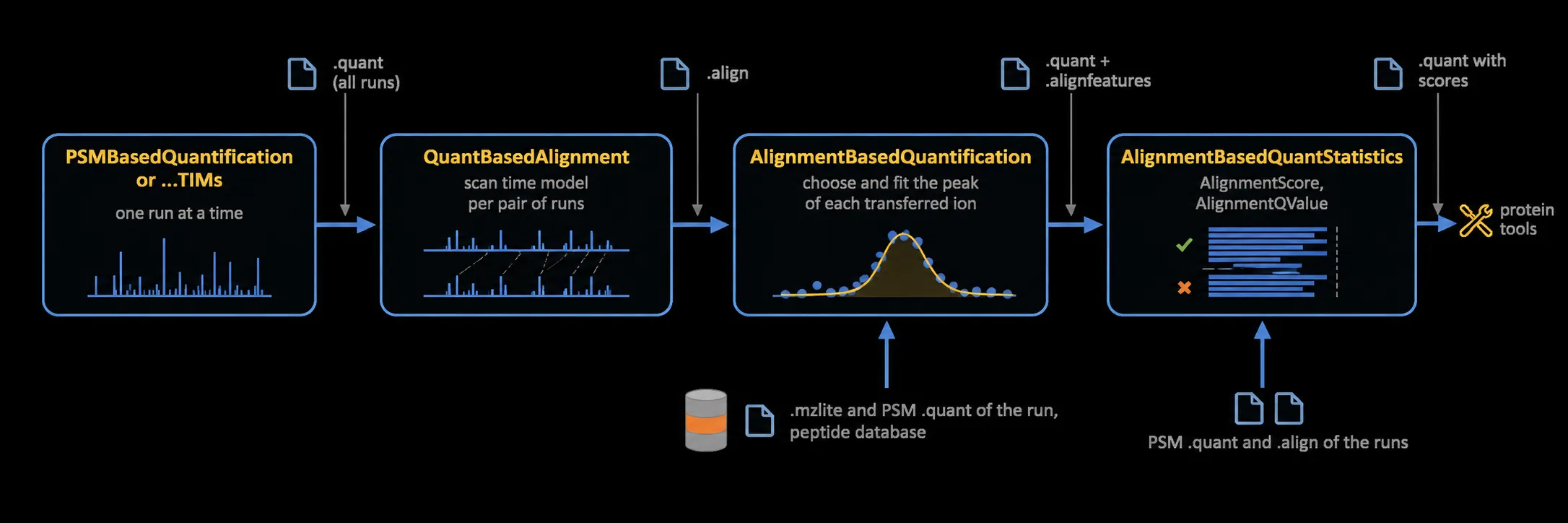
How does QuantBasedAlignment work?
The tool works on each pair of target and source run separately.
Identify Shared Peptide Ions
The model uses the ions (sequence, modifications, charge) that both runs quantified with a successful peak fit whose identification scan time lies within two standard deviations of the apex of the fitted peak. A pair needs at least 20 shared ions.
Calculate Retention Time Shifts
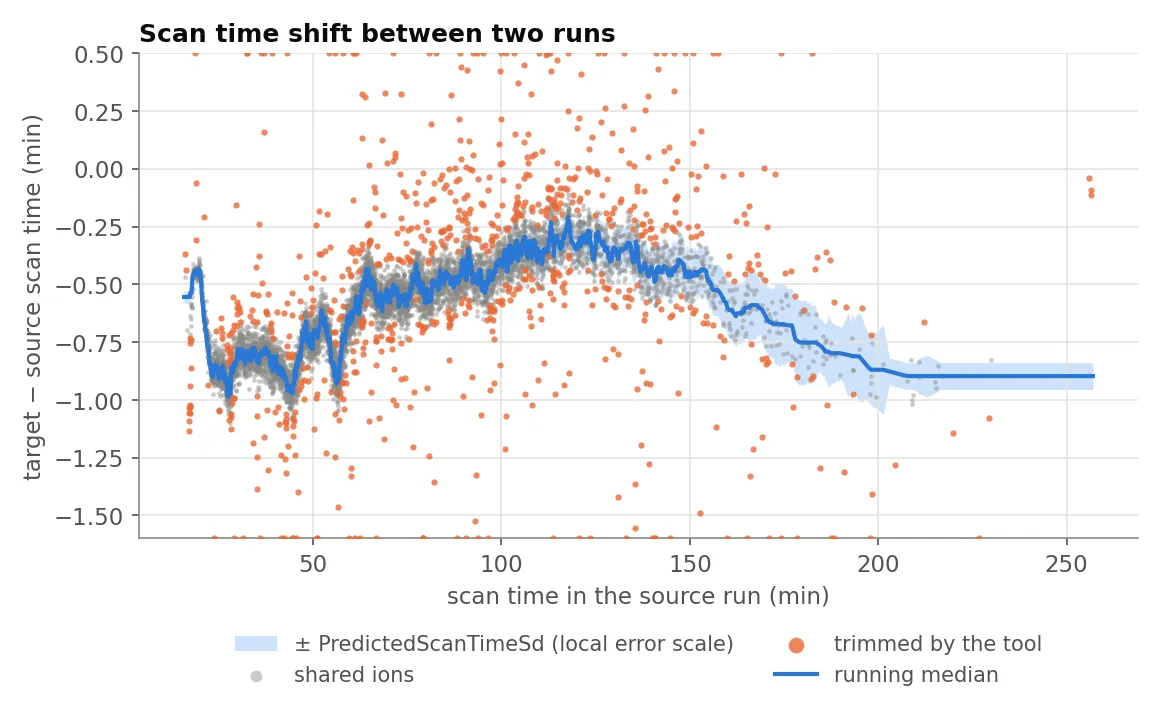
It describes the shift target scan time − source scan time as a function of the source scan time. Each point of the curve is the median shift of the k shared ions nearest in source scan time. Between ions the curve is interpolated linearly, beyond the first and last ion it is constant.
Remove Outliers
Some shared ions have a wrong peak in one of the two runs and lie far from the true shift. Before the final fit, up to three rounds remove ions whose residual exceeds max(3 · 1.4826 · MAD, 0.05 min), where MAD is the median absolute deviation of the residuals.
Optimize Model Parameters
kis chosen from5,7,11,15,21,31,41,51,71and101by 5-fold cross-validation on the median absolute error, with folds by peptide sequence.-sseeds the folds.Rank Source Runs and Transfer Ions
The sources of a target are ranked by their median absolute out-of-fold error. Each ion is transferred from the best ranked source that has it.
Estimate Prediction Uncertainty
PredictedScanTimeSd is 1.4826 times the median absolute out-of-fold error of the shared ions within ±5 min of the ion's source scan time, and at least 0.01 min. With fewer than 10 ions in the window the scale of the whole pair is used. It is small where the runs agree and large where they do not, for example at the end of the gradient.
Only source ions that pass the filter of step 1 are transferred. Ions the target quantified itself, called overlap ions, are transferred too, because the two following tools learn from them. They get the prediction of the fold that did not contain them, so their errors are comparable to those of new ions.
Ion mobility
The tool aligns the IonMobilityCentre of the .quant rows. When both runs of a pair have finite values on the shared ions, it fits the same model to the ion mobility shift over the source ion mobility. Its trimming floor is 0.005 1/K0, its error scale uses the shared ions within ±0.05 1/K0 and is at least 0.001. The results go into PredictedIonMobility and PredictedIonMobilitySd. Without ion mobility both columns hold nan. There is no switch.
InputsFiles and command-line flags
| Flag | Meaning | Comes from |
|---|---|---|
-i |
one or more .quant files of the target runs, or a directory that is searched for *.quant |
PSMBasedQuantification or PSMBasedQuantificationTIMs |
-ii |
one or more .quant files of the source runs, or a directory that is searched for *.quant |
same as above |
-o |
the output directory, created when missing | - |
-s |
seed of the cross-validation folds, default 1 | - |
-dc |
switch: write <run>_ScanTimeModels.html with the shifts, curves and out-of-fold errors per source |
- |
-c |
number of targets aligned in parallel, one core each, default 1 | - |
- There is no parameter file.
- A target is never its own source, so the same directory can be passed to
-iand-ii. - The tool stops when an input path does not exist, when the paths of
-ior those of-iihold no.quantfile at all, and when two input files from different directories have the same name. - For every target the tool writes
<run>.align, tab separated, one row per transferred ion.
OutputsGenerated data and log files
Each .align row starts with the peptide-ion identifiers, its m/z, its predicted scan time in the target, and its scan time, intensity, traces and isotope pattern in the source. The source IonMobility is the IonMobilityCentre of the source .quant row. The following five fields complete the row.
| Column | Description |
|---|---|
| PredictedScanTimeSd | local error scale of PredictedScanTime, in minutes |
| SourceFileName | source run of the ion, without extension |
| SourceModelError | median absolute out-of-fold error of the model of this source, in minutes |
| PredictedIonMobility | predicted ion mobility in the target, nan without ion mobility |
| PredictedIonMobilitySd | local error scale of PredictedIonMobility, nan without ion mobility |
<run>.align is read by AlignmentBasedQuantification and AlignmentBasedQuantStatistics. <run>.alignmetric contains the held-out predictions and measurements from the first cross-validation fold. No later tool reads it. Logs go to QuantBasedAlignment_log.txt and one <run>_log.txt per target. Per pair they give the numbers of shared and removed ions, the chosen k and the out-of-fold errors. A target without any source that shares 20 ions with it gets a warning.
Running the tool
-
Installing
Install the tool globally with the .NET CLI.
dotnet tool install --global ProteomIQon.QuantBasedAlignment -
Align every run of an experiment against all others, four at a time
proteomiqon-quantbasedalignment -i path/to/quant -ii path/to/quant -o path/to/align -c 4 -
Align one target against two sources
proteomiqon-quantbasedalignment -i path/to/target.quant -ii path/to/source1.quant path/to/source2.quant -o path/to/align -
All Flags
proteomiqon-quantbasedalignment --help
Limitations
- The trimming floor (0.05 min) and the error scale window (±5 min) are fixed.
- Pairs with fewer than 20 shared ions are skipped. Runs with few identifications get few or no sources.
- Every target is fitted against every source, so the run time grows with the square of the number of runs.
- The tool is meant for runs of one organism on one LC setup. Fractionated samples and DIA data are not supported.