


ProteinInference
A peptide identified by PSMStatistics often fits more than one protein, for example two splice variants of the same gene. ProteinInference maps the identified peptides back to proteins and reports protein groups: sets of proteins that share their peptide evidence. Each group gets a score from its peptides and a decoy score from the reversed proteins, and from these a protein level q-value.
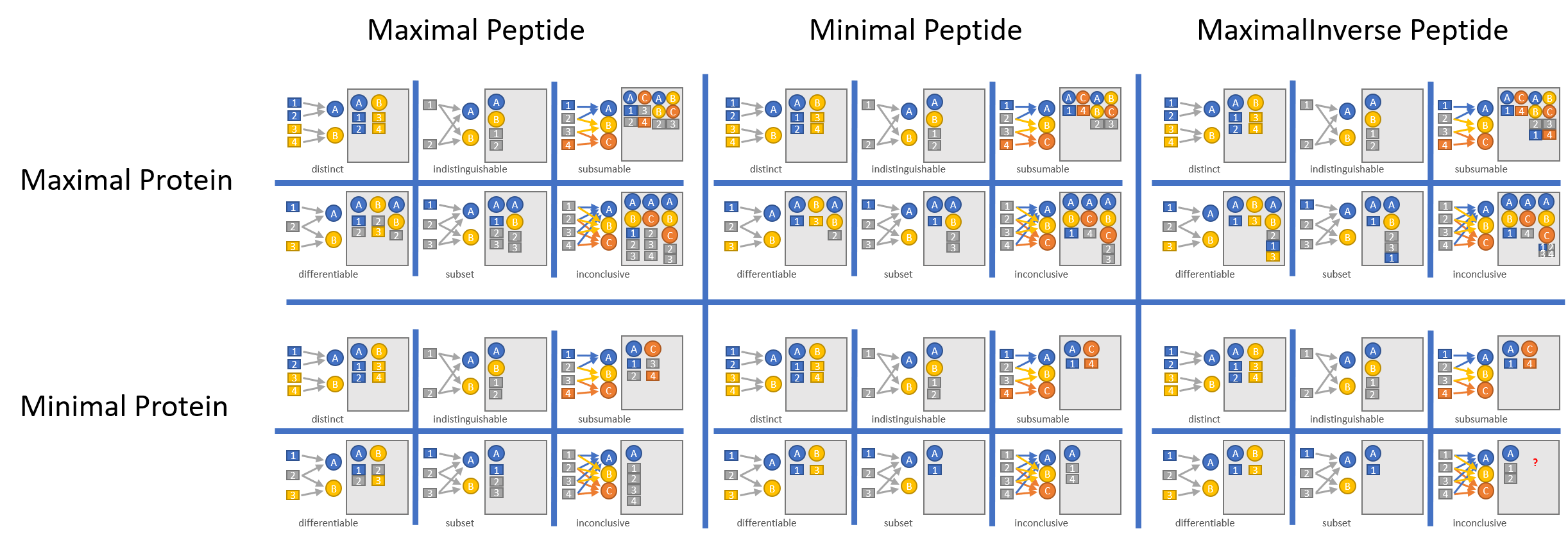
Two parameters decide how groups are formed and which peptides count for them. Take two proteins pA and pB, each found by one unique peptide and both by a third shared peptide. Protein (the integration strictness) decides whether pA, pB and the group pA;pB are all reported or whether overlapping groups are merged into the smallest set that explains every peptide. Peptide (the peptide usage) decides whether the abundance of pA;pB later comes from the shared peptide only or also from the peptides unique to pA and pB. The figure shows the outcomes for every combination.
Inputs and outputs
Flag |
Meaning |
Comes from |
|---|---|---|
|
one or more |
|
|
the SQLite peptide database |
|
|
optional GFF3 annotation of the proteome |
your genome annotation |
|
the output directory, created when missing |
|
|
the parameter file in JSON |
this page |
|
switch: save diagnostic charts to the output directory |
The GFF3 file tells the tool which proteins are transcripts of the same gene. With it the Class column (the peptide evidence class) separates groups made of isoforms of one gene from groups that mix unrelated proteins. Without -g every database protein counts as its own gene and the class carries no such information.
For every input run.qpsm the tool writes run.prot, tab separated with a header and the columns ProteinGroup (protein identifiers joined by ;), PeptideSequence (the peptides of the group found in this run, joined by ;), Class, TargetScore, DecoyScore and QValue.
JoinQuantPepIonsWithProteins and AddDeducedPeptides read .prot files.
With -dc the tool saves a chart of scores against q-values, as QValueGraph.html in the output directory when the files are grouped and as run.prot_QValueGraph.html per run otherwise. Logs go to ProteinInference_log.txt and a few ProteinInference_<step>_log.txt files in the output directory. There is no parallelism flag.
Parameters
Parameter |
Default |
Meaning |
|---|---|---|
|
|
Regex that extracts the protein identifier from the protein names in the database and, with |
|
|
|
|
|
|
|
|
Infer all input files together: the peptides of every run go into one inference and one q-value calculation, and every output file reports the same protein groups, each restricted to the peptides seen in that run. AddDeducedPeptides needs this. |
|
|
Estimate the protein FDR with MAYU and turn it into q-values by logistic regression on the target and decoy scores. The other FDR estimates are |
The default file is ProteinInferenceParams.json.
Writing a parameter file
open ProteomIQon
open ProteomIQon.Domain
open BioFSharp.Mz

let proteinInferenceParams : Dto.ProteinInferenceParams =
    {
        ProteinIdentifierRegex = @"Cre\S+"
        Protein                = ProteinInference.IntegrationStrictness.Maximal
        Peptide                = ProteinInference.PeptideUsageForQuantification.Minimal
        GroupFiles             = true
        GetQValue              = QValueMethod.LogisticRegression FDRMethod.MAYU
    }

// Replace the temp folder with your project folder.
let outputPath = System.IO.Path.Combine(System.IO.Path.GetTempPath(), "ProteinInferenceParams.json")

Json.serializeAndWrite outputPath proteinInferenceParams
Outputs
The resulting .prot file is generated as a tab-delimited text file.
These columns can be inspected individually to examine specific search results, scoring metrics, and identification parameters.
Column |
Description |
|---|---|
ProteinGroup |
Protein Identifier Collection |
PeptideSequence |
List of all peptides assigned to this protein group |
Class |
Peptide Evidence Classes (C1A, C1B, C2A, C2B, C3A, C3B) which define how a peptide has been assigned to its corresponding protein |
TargetScore |
Target Score calculated based on the individual peptide scores of PSM |
DecoyScore |
Decoy Score calculated based on the individual peptide scores of PSM |
QValue |
Q-value (False-Discovery-Rate) for every identified protein |
For more information on the columns, please refer to the Protein Inferencethe BioFSharp.Mz documentation.
Running the tool
Install with dotnet tool install --global ProteomIQon.ProteinInference, then infer the proteins of one run:
|
Several runs grouped together, with the annotation for the evidence class:
|
A whole directory, with the q-value chart:
|
All flags:
|
module ProteinInferenceParams from ProteomIQon.Dto
--------------------
type ProteinInferenceParams = { ProteinIdentifierRegex: string Protein: IntegrationStrictness Peptide: PeptideUsageForQuantification GroupFiles: bool GetQValue: QValueMethod } member Equals: ProteinInferenceParams * IEqualityComparer -> bool
<summary> Used to decide wether overlapping groups of proteins should be kept or merged </summary>
<summary> All protein groups stay intact </summary>
<summary> Used to decide which peptides should be used for quantification of protein groups </summary>
<summary> Use only the best matching peptides </summary>
<summary>Performs operations on <see cref="T:System.String" /> instances that contain file or directory path information. These operations are performed in a cross-platform manner.</summary>
System.IO.Path.Combine([<System.ParamArray>] paths: string array) : string
System.IO.Path.Combine(path1: string, path2: string) : string
System.IO.Path.Combine(path1: string, path2: string, path3: string) : string
System.IO.Path.Combine(path1: string, path2: string, path3: string, path4: string) : string